What it does
Seven jobs Keely takes off your office
From the first booking to the logbook, these are the jobs that fill an office's week. Each one is below, line by line, and you can see every one working with your own courses in a walk-through.
Job 01 of 07
Bookings and courses
Every booking in one diary, however it came in, with the places left on your website. No second spreadsheet.
Bookings and courses in detail
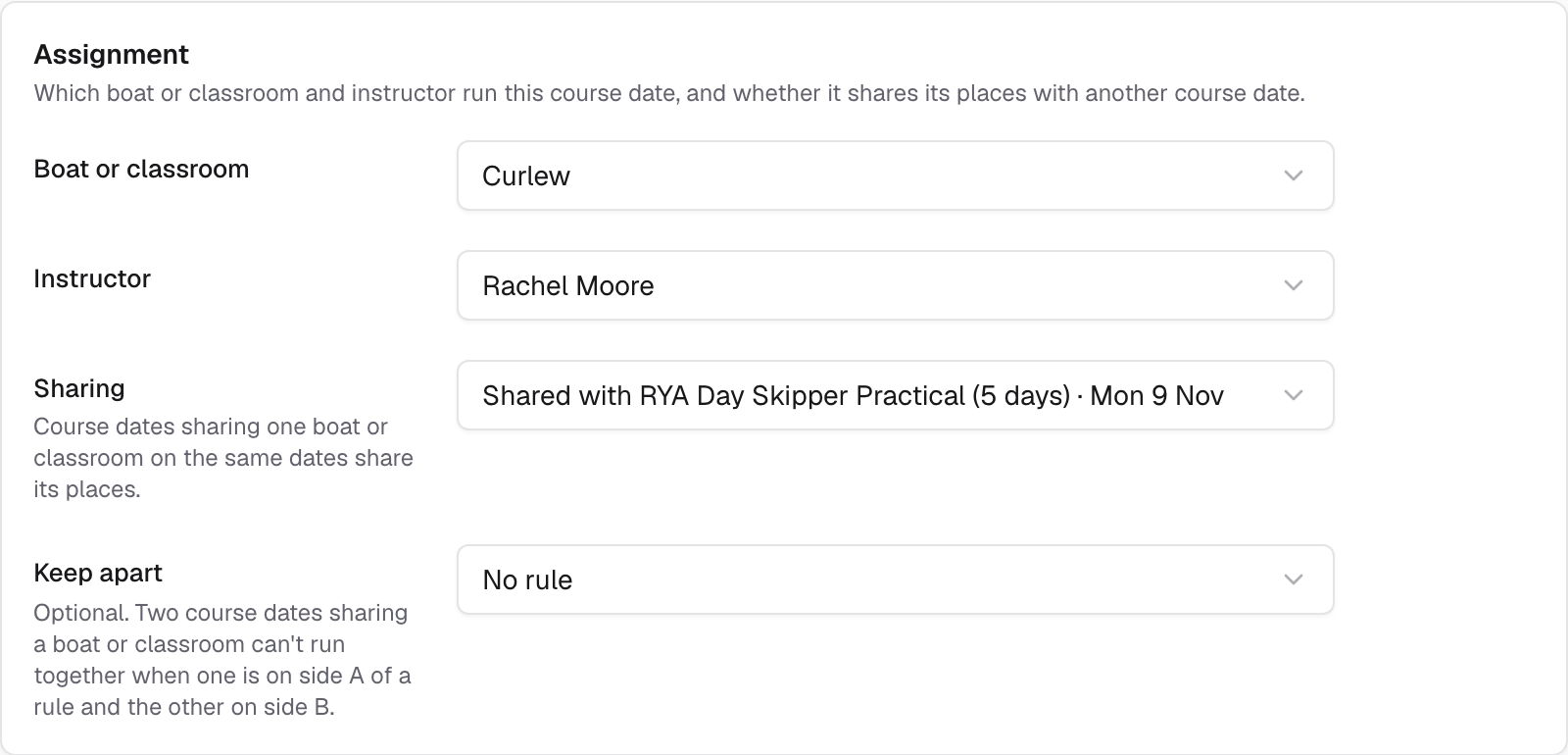
- Courses that share a yacht
Day Skipper and Competent Crew on the same boat count against the same berths, so both course pages show the right places left.
- Phone, email and walk-in bookings
Build an order while they are on the phone and send a link to pay, or record a bank transfer or cash.
- Deposits and balances
Take a deposit when they book. The balance is charged to their saved card before the course, or they get a link to pay.
- Waitlists you control
When a place frees up, the office offers it to the next person. The offer runs out if they do not take it. People can join the list from your website too.
- Packages and gift vouchers
Sell theory and practical together, and gift vouchers that customers redeem at checkout.
- Check-in on a phone
Expected, arrived and attended, for one student or the whole course at once.
- Moving a booking to another date in one step
Pick the new date and Keely moves the booking across, with everything the customer has paid.
- Holding the last place while a customer pays
The place is held for the customer while they pay at the checkout.
- Customers choosing a new date after weather
When you cancel for weather, each customer picks a new date from your website, or takes the refund or credit you offer. Keely records it.
Job 02 of 07
Student paperwork
Students fill in their forms on their own phone, and Keely chases anyone who has not. Nobody in the office has to.
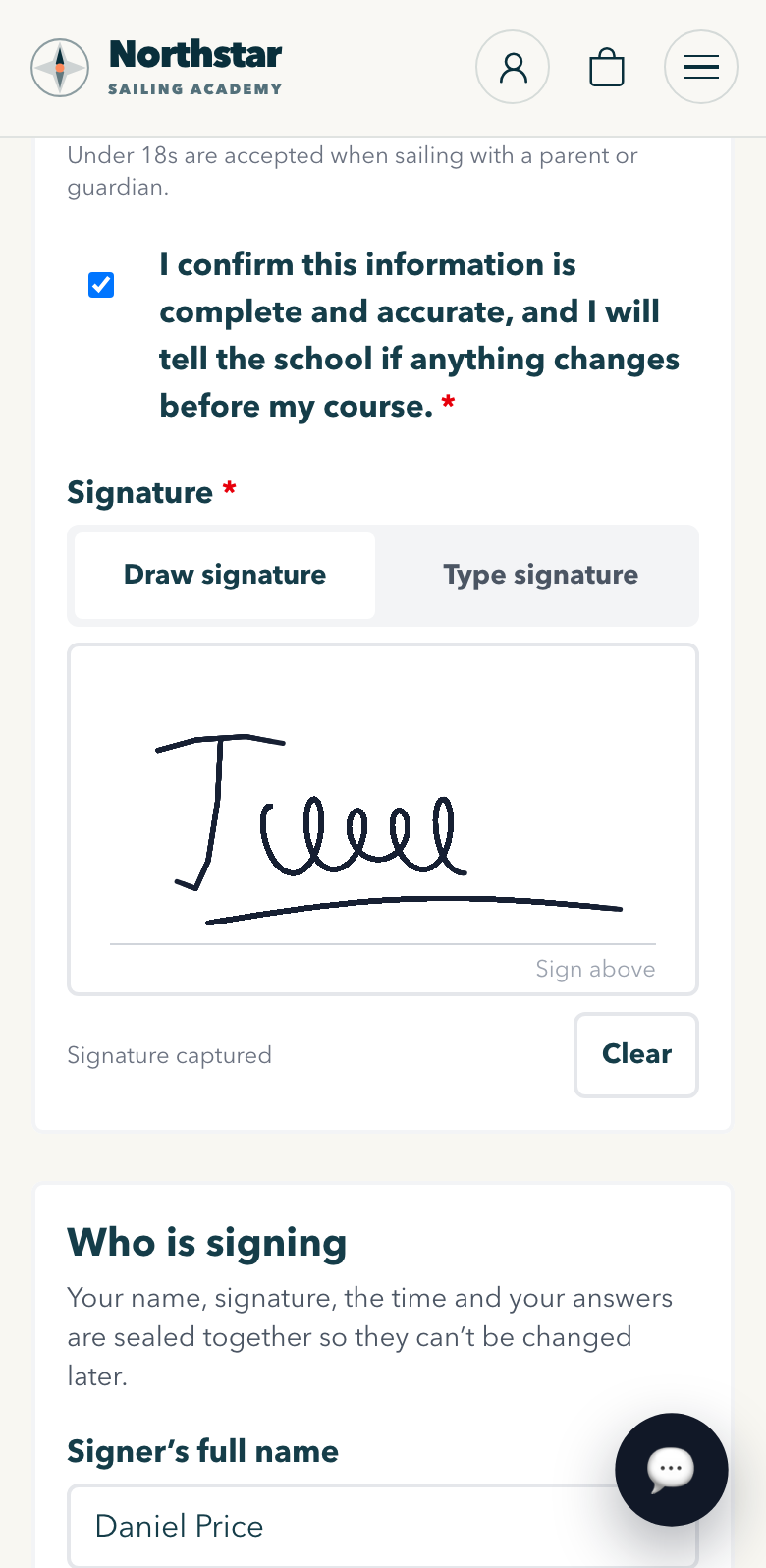
- Forms sent on booking
Medical declaration, next of kin, experience and dietary needs, in your words. Students sign on screen, and a parent or guardian signs for under-18s.
- Chased for you
Reminders go to anyone who has not finished. The Forms desk shows who still owes what, course by course.
- Every version kept
Once a form is published its wording is locked. Each signed copy is kept with its version and the time it was signed.
- Joining instructions on their phone
Boat, instructor, meeting point, kit list and an entry for their calendar, on a private link.
- A crew list for each boat
Printed or as a spreadsheet, with emergency contacts. Medical notes are shown only to the office and that course's instructor.
- Logbook and completion record
The instructor records attendance, miles and the outcome. Each completion record has a number anyone can check online. RYA certificates still come from the RYA.
- Adding files to a form
Students add a photo of a previous certificate or a document to their form, from their phone.
Job 03 of 07
Boats, instructors and the day
Ready for the inspector on any day of the season. Keely warns you before something out of date goes on a course.
Boats and instructors in detail
- A list of checks for every boat
Liferaft service, EPIRB, flares, gas, fire extinguishers and first aid, each with its next due date in red, amber or green.
- Documents on each boat
Attach each certificate to the check it proves, and open it without downloading.
- Instructor tickets
RYA qualifications with expiry dates. Instructors renew from their phone, a manager checks it, and reminders go out at 90, 30 and 7 days.
- Who goes on which boat
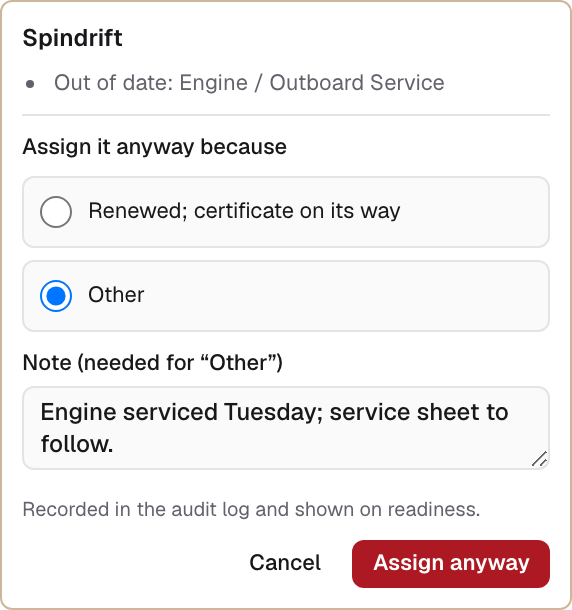
Keely suggests a boat and an instructor. If something is out of date, it warns you and asks for a reason, and keeps the reason on record.
- Rooms and classrooms
Book rooms by the day or half day, with a warning when there are too many students for one instructor.
- The day on one screen
Today's courses, who has arrived, missing forms, incidents and which boat each crew is on.
- Two-way Google Calendar sync
Courses go into each instructor's Google Calendar and their busy times come back into Keely. Outlook and Apple Calendar users add their Keely schedule as a feed.
Seven jobs off the office, so the people who teach can get on with it.
Three down. The other four are your website, customers and email, money, and partner schools.
Job 04 of 07
Your website and shop
A website that takes bookings at night and at weekends, with the same dates and places as the office diary. Your brand, your own web address.
Your website and shop in detail
- Pages you change yourself
A page editor with ready-made sections, a blog, questions and team pages. See every change before it goes live.
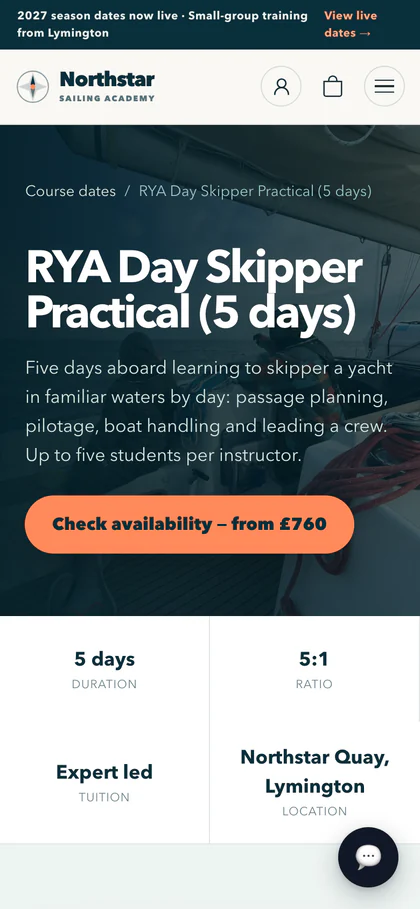
- Course pages with live dates
Customers pick a date and the number of places, see how many are left, and enter each person's details.
- A checkout in your colours
One page, with Apple Pay, Google Pay and saved cards, paid into your own Stripe account.
- Charts, kit and course packs
Sold in the same basket as courses. The packing screen checks each item, so the wrong pack does not go out.
- Theory courses under your name
Sell Sailing Course Online's theory courses on your own site as a partner school. The student is enrolled on the learning platform for you.
- Postage labels
Printed on your own Royal Mail, DPD or DHL account, once you connect it.
- Listings on Viator, GetYourGuide and Google Things to Do
Your courses shown and booked on those sites, using the same dates and places.
Job 05 of 07
Customers and email
Whoever picks up a message already has the whole story: the booking, the forms and what has been paid.
- One inbox for the office
Customer email in one shared inbox, with who is dealing with it, saved replies and how long people wait for an answer.
- Live chat on your website
Visitors message you from any page and see your reply in the chat. When the office is closed, they leave their email and your reply goes there.
- The whole customer on one screen
Orders, bookings, forms, messages, notes and tasks.
- Automatic emails, set up once
Confirmations, form reminders, joining instructions and balance reminders. You can see what was sent to whom, and why.
- Newsletters
Send to the right people, chosen by how much they have spent, when they last booked or whether they opened your last email. Unsubscribes and consent are handled.
- Reviews on your course pages
Show your Feefo reviews and keep them up to date, or collect your own after each course.
- Text messages
Reminders by text, sent by Keely, with a monthly allowance for each school.
Job 06 of 07
Money and reports
Balances paid without chasing, straight into your own Stripe account, and a clear view of what each order made.
- Your money goes to your own Stripe account
Keely never holds it. Stripe pays it into your bank on your own Stripe account's schedule.
- VAT invoices and credit notes
Numbered PDF invoices for every order.
- Refunds and credit
Full or part refunds, split correctly between the card and any credit or voucher used.
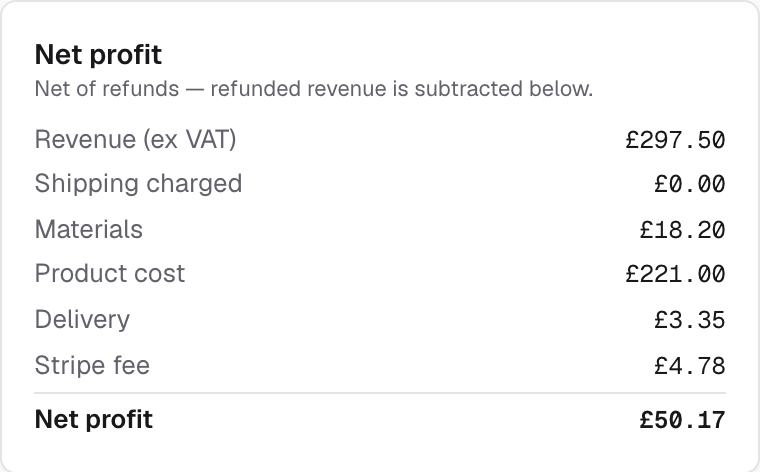
- What each order made
The sale after materials, postage, card fees and any partner's commission.
- Reports that show the sum
Bookings, sales, and boats and rooms in use, each with how the number is worked out. Download as a spreadsheet or PDF.
- Xero
Invoices and credit notes posted to your Xero account once you connect it.
- A card reader at reception
Take card payments at the desk, recorded against the order as they happen.
- QuickBooks or FreeAgent
Invoices and credit notes posted to QuickBooks or FreeAgent, for schools that do not use Xero.
Job 07 of 07
Several schools and partner schools
Run several schools from one screen, and let other schools sell your courses for commission, worked out on every order.
- Several schools in one company
Each with its own website, brand, Stripe account, staff and customers, and one view across them all.
- Add a partner school in six steps
Details, website, commission, courses, payment and invite. You can stop part-way and come back to it.
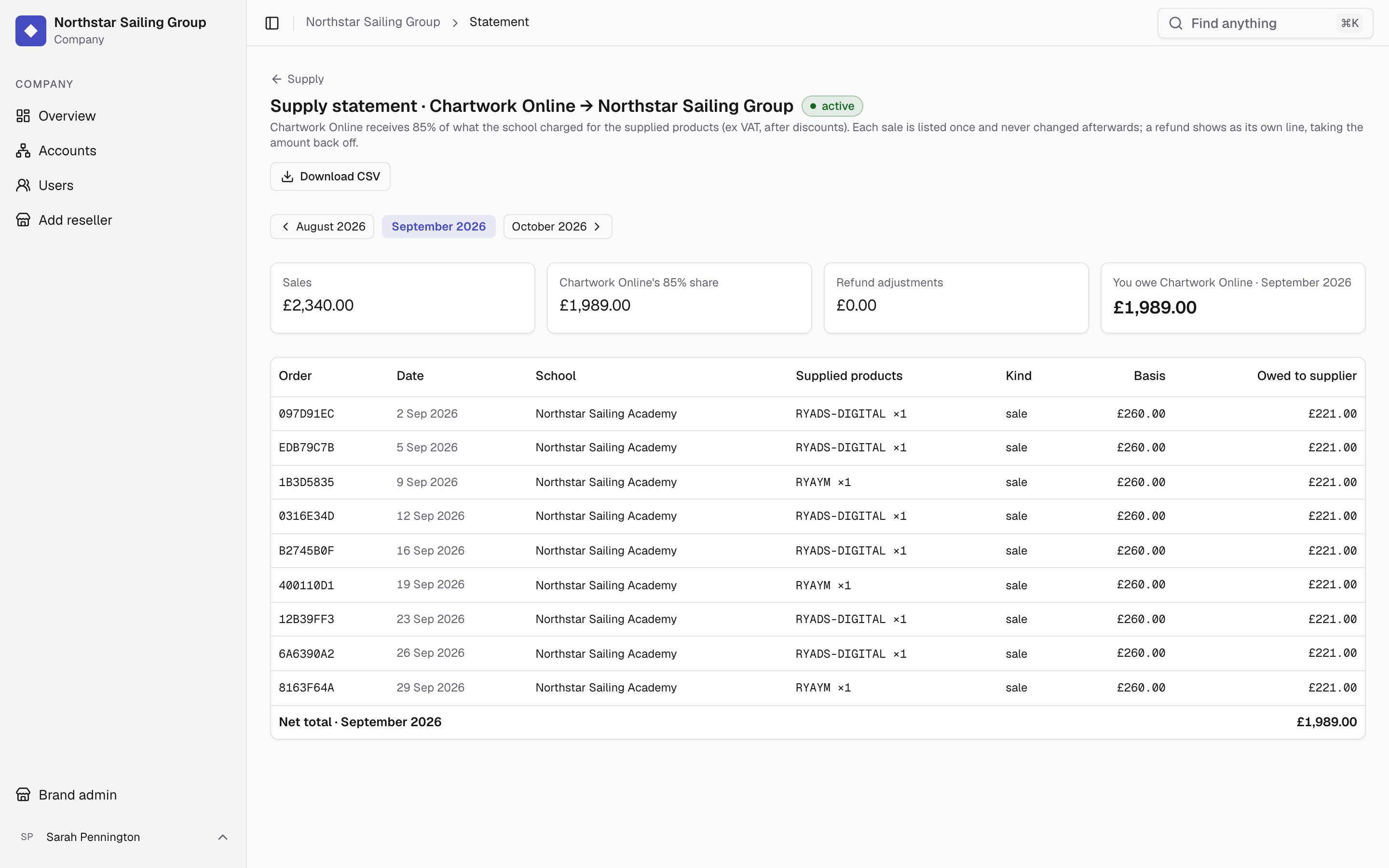
- Commission on every order
A percentage or a wholesale price for each partner. Refunds take the commission back, and every month has a statement.
- Your partners' own area
Their orders, learners, courses and earnings, without seeing anyone else's.
- Proposal pages for new partners
A private page for each school you are talking to, built from your live prices, showing you when they opened it.
- Paying partners automatically
At the end of each month, each partner is paid what it is owed from your Stripe account, and its statement is marked settled.
Book a walk-through
Book a walk-through
See all seven jobs set up for your courses
Thirty minutes with Jake. Tell us which courses you run and we will show them to you, set up in Keely. No slides.
- £150 a month + 1.5% of bookings paid online
- Free, 30 minutes, Monday to Friday, 09:00 to 17:00 UK time

Jake Holmes runs every walk-through.
If Keely isn't right for you in the first 60 days, leave and pay nothing more. We'll hand you your data.
Choose a time
Times shown in UK time
Your details
Not taking bookings right now
Email us at hello
We use your details only to arrange the walk-through. Privacy notice: keelyapp.com/legal/privacy